Homeio
CosmosvsHomeio
⌘KAlternative to Cosmos

Cosmos secures the way in. Homeio manages the box behind it.

Cosmos is built around a security gateway: a reverse proxy, single sign-on and SmartShield in front of every app. Homeio is built around the server itself: a desktop with files, disks, Samba shares, scheduled tasks and backups. If exposing apps safely is the job, Cosmos is ahead. If running and looking after the machine is, Homeio does more of it.

Homeio
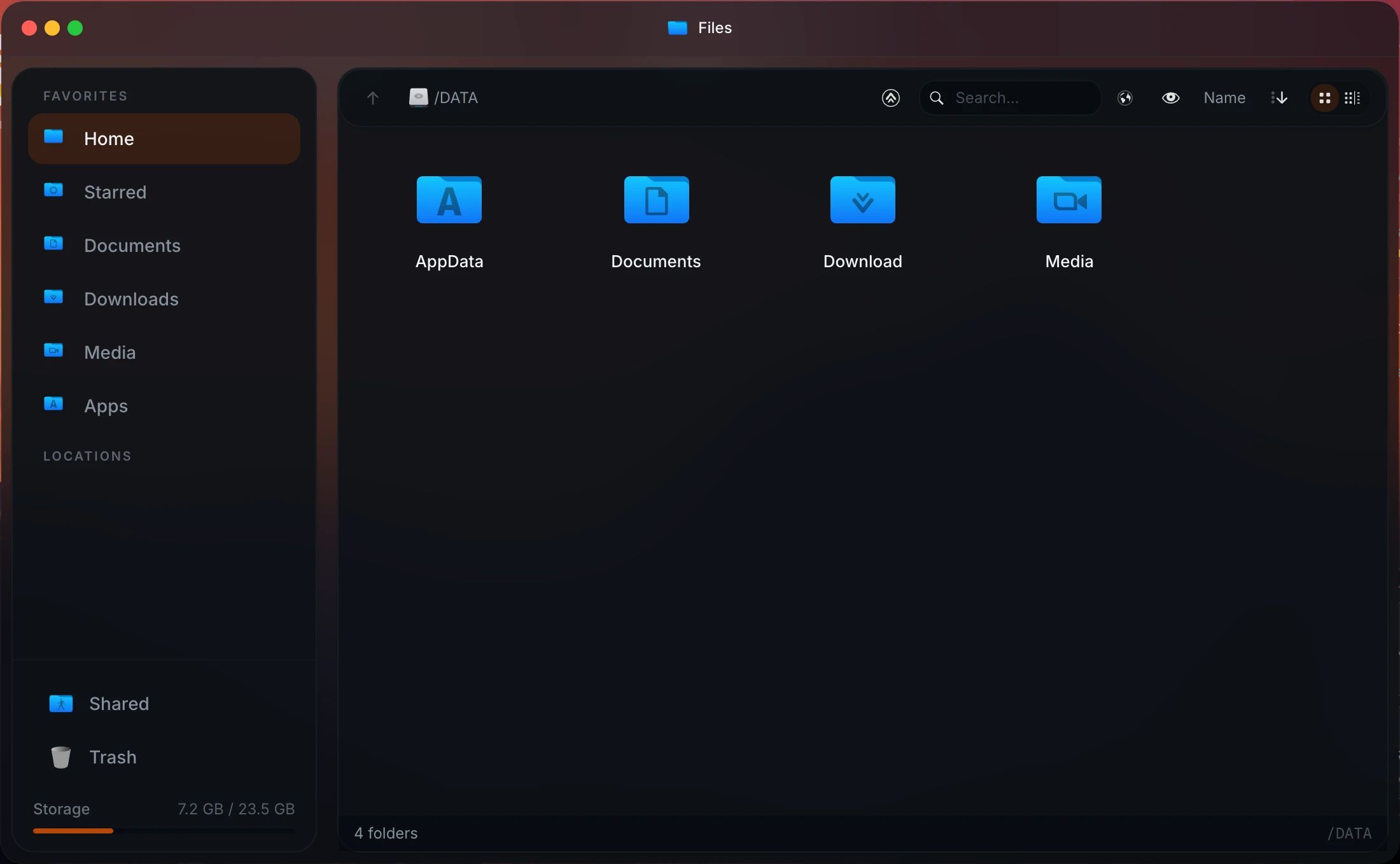
Homeio file manager, which Cosmos does not have
⌘1Differences

What changes if you switch.

  • 01A desktop with a real file manager: previews, a Monaco editor, zip, uploads and USB drives. Cosmos has no file manager.
  • 02Folders shared over Samba, and SMB shares from other machines mounted, from the same window.
  • 03Disks partitioned, formatted and mounted from Settings, in ext4, XFS, Btrfs, exFAT, NTFS or FAT.
  • 04The CasaOS app store as the catalogue, plus any Compose file or docker run command.
  • 05Remote access through Tailscale, and Cloudflare Tunnel for apps you share, instead of a proxy with open ports.
  • 06Installed as systemd services behind Nginx, not as a privileged container with the host filesystem mounted.
  • 07MIT licence, with no paid tier.
⌘2Side by side

Job by job.

NeedIn Homeio
Browse and edit files

A file manager with previews, uploads and downloads, zip, search and a Monaco editor for compose files and configs. USB drives appear live.

Cosmos: no file manager. Network storages through rclone.

Share folders on the network

Share local folders over Samba and mount SMB shares from a NAS or another PC, from Settings.

Cosmos shares network storages through rclone, including NFS and FTP.

Disks

Partition, format and mount disks, with filesystems from ext4 and Btrfs to exFAT and NTFS.

Cosmos pools disks with MergerFS and protects them with parity disks, which Homeio does not do.

Put an app on your own domain

Publish it through Cloudflare Tunnel: Homeio writes the DNS record and ingress rule, Cloudflare handles HTTPS, and no router ports open.

Cosmos: built-in reverse proxy with automatic HTTPS, its strongest area.

One login for every app

Not available. Homeio's login, with TOTP two-factor and rate limits, protects Homeio itself.

Cosmos is an OpenID Connect provider with multi-factor login. Pick Cosmos for this.

Accounts for family and friends

Not yet. One account today; multi-user with roles is planned for 2.0.

Cosmos has users, invitations and password reset by email.

Reach the server from anywhere

Tailscale, configured in Settings → Integrations.

Cosmos has Constellation, a peer-to-peer VPN built on Nebula, with a lighthouse for CGNAT.

Backups

Weekly archives of the database, /DATA and your compose stacks, seven kept, restored from Settings. They sit on the same disk; copy them off.

Cosmos uses restic: incremental, encrypted, with remote destinations. Cosmos is ahead here.

Scheduled jobs

Cron tasks for commands, scripts, app restarts, backups and image pulls, with a notification when one fails.

Cosmos also has a cron scheduler, on the host or inside containers.

Monitoring

Live CPU, memory, disk and network for the host and each container. No alert rules yet.

Cosmos keeps history and sends alerts.

⌘?FAQ

Questions people ask before switching.

Is Homeio a replacement for Cosmos?

Only for some people. If you use Cosmos mainly as an app store and container manager on a server you reach over a VPN, Homeio covers that and adds a file manager, disk tools and Samba shares. If you rely on Cosmos's reverse proxy, single sign-on, multiple users or SmartShield to expose apps to the internet, Homeio does not replace those today.

What does Cosmos do better than Homeio?

Everything about exposing apps safely. Cosmos is a reverse proxy with automatic HTTPS, an OpenID Connect provider with multi-factor login for all your apps, a user system with invitations, anti-bot and anti-DDoS protection, a peer-to-peer VPN, restic-based incremental and remote backups, and monitoring with history and alerts. Homeio has none of the first four, simpler backups, and live monitoring without alert rules.

What does Homeio have that Cosmos does not?

A desktop-style interface with a file manager: browse, upload, preview and edit files with a Monaco editor, zip and unzip, handle USB drives, share folders over Samba and mount SMB shares from other machines. Cosmos's own comparison table lists no file manager. Homeio also partitions and formats disks, uses the CasaOS app store, and sets up Tailscale and Cloudflare Tunnel from Settings.

Can I run Homeio and Cosmos on the same server?

Yes, with one adjustment. Cosmos runs on the host network and wants ports 80 and 443 for its reverse proxy, and Homeio's script install also serves on port 80. Install Homeio with HOMEIO_PUBLIC_PORT=8080, or use its Docker install on port 12026, and you can even route Homeio through Cosmos. Homeio shows the containers Cosmos manages, read-only.

How is each one installed?

Cosmos runs as a privileged Docker container with the Docker socket and the host's root filesystem mounted, on x86-64 or ARM64. Homeio's install script sets it up as systemd services on Debian, Ubuntu or Raspberry Pi OS, behind Nginx and with fail2ban, or you can run it with Docker Compose instead.

Does Homeio support multiple users or single sign-on?

Not yet. Homeio has one account, with TOTP two-factor login and backup codes, and it protects Homeio itself rather than the apps behind it. Multi-user with roles is planned for 2.0. If you need several people signing in to several apps with one account, Cosmos is the better fit.

Are Cosmos and Homeio free?

Both are free for a home server. Cosmos is licensed Apache 2.0 with the Commons Clause, which allows use and modification but not selling it; its paid Pro tier, from $16 a month, is for businesses running several servers. Homeio is MIT licensed with no paid tier.

How do I reach apps from outside without Cosmos's proxy?

For yourself, Tailscale: Homeio sets it up from Settings, and nothing is exposed to the internet. For an app you share with other people, Homeio publishes it through Cloudflare Tunnel on your own domain, creating the DNS record and ingress rule for you; Cloudflare terminates HTTPS, and no ports are opened on your router.

How do I install Homeio?

curl -fsSL https://get.homeio.app | sudo bash on Debian, Ubuntu or Raspberry Pi OS (UI on port 80, or the port in HOMEIO_PUBLIC_PORT), or docker compose up -d from a clone of the repository (UI on 12026). The first account you create is the only one; registration closes behind it.

⌘3Next step

Try it next to what you run now.

The demo needs no install. On a spare machine or a VM, the Docker install takes a few minutes and listens on port 12026, so it does not fight your current setup for port 80.

⌘4Keep reading